Quickbooks Desktop Import Errors
Error During QBO (Web Connect) Import
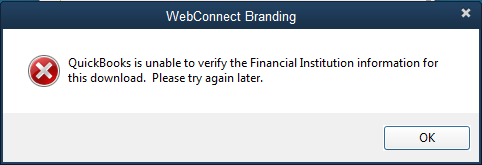 Web Connect Error
Why would QuickBooks give such a message? Follow the following steps to figure out the reason and fix the issue:
Step 1: Check if you have discontinued the Quickbooks version
If your QuickBooks copy is three years old (for example, for current 2024, QuickBooks 2021 or earlier (or QuickBooks Enterprise 21 or earlier), it will not import the ".QBO" files.
Solution (one of below):
- Update Quickbooks and import the QBO file again
- Use the ProperConvert app to convert the QBO file to an IIF file and import the IIF file instead
Step 2: Your financial institution is no longer "allowed"
Your bank or credit card company (a financial institution) is no longer allowed by Quickbooks.
Solution: Use the ProperConvert app to change INTU.BID to "allowed" financial institution value (for example. INTU.BID 3000) and create a new QBO file.
Step 3: The QBO file was created incorrectly by your financial institution or a third-party app
Your ".QBO" file was incorrectly created or “not ready” for your QuickBooks version. Banks and credit card companies create the ".QBO" files differently.
QBO files are extended OFX files (QBO is also called QuickBooks OFX), but there are some small but important differences between QBO and OFX files. QBO files may follow OFX specifications, but this is not acceptable for QuickBooks. In addition, different QuickBooks versions have slightly different requirements for “good” QBO files.
If you used a third-party app to convert a CSV or PDF file to QBO, this QBO file may have an incorrect structure.
Solution: Use the ProperConvert app to open a non-working QBO file from your financial institution and convert it to a new correct and importable QBO file.
Step 4: The QBO file is for Quickbooks for another country edition
- If you have Quickbooks Canadian vs. UK vs. USA edition, the QBO file may have incorrect settings that make it incompatible with your Quickbooks version/edition.
Solution: Use the ProperConvert app to correct a QBO file's financial institution and currency and convert it to a new QBO file.
Learn More
- QBO - What is QBO (web connect) file format?
- OFX - What Is OFX File Format and How to Open it?
- IIF - What Is IIF File Format and How to Open it?
- QuickBooks - How to import transactions into Quickbooks
Related articles
- Convert CSV/Excel to IIF and import into QuickBooks
- Convert CSV to QBJ and Import into Quickbooks Desktop
- Convert CSV/Excel to QBO and import into QuickBooks
- What are OFX, QFX, QBO (Web Connect) files?
- Convert PDF statements to a QuickBooks-compatible format
- Convert QFX to QBO and import into Quickbooks
- Convert QIF to QBO and Import into QuickBooks